

中文注释: Warkey++ 5.1 英文版 (比较中文版的功能略有改动)
**************************************************************************************
*
* Copyright Yulv.net All right reserved
*
* From Http://Www.YuLv.Net
*
**************************************************************************************
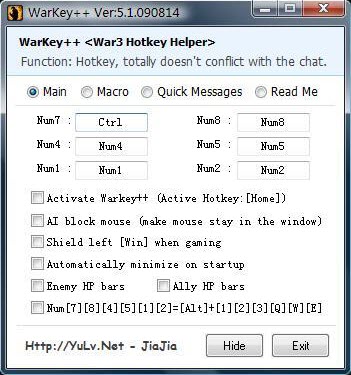
Hi guys. This tool helps you to edit the key of Numpad.
Warkey++ Yours WarCraft3 Hotkey Helper
Program features:
The warkey++ doesn't effect the chat system (will automatically disable warkey when typing) and it is easy to use.
Hotkey:
Active/disable "hotkey function" hotkey [Home]
Active/disable "AI block mouse" hotkey [End]
(Alt+[) Hotkey: show ally's hp bar
(Alt+]) Hotkey: show enemy's hp bar
(Alt+M) Hotkey: check current state of function
(Alt+P) Hotkey: Pause/Resume "game"
(Alt+F4) Hotkey: Quit Game
Automatically shield left [Win] when gaming
Authors: Jiajia [From Http://Yulv.net]
E-mail: YuLv_Soft@126.Com
Features:
1.This program supports the latest War3 1.24patch.
2.Active/Disable Enemy/Ally HP bars
3.Macro hotkey
4.Quick Message
5.Very simple and nice interface. Strong function.
REQUIREMENTS:
all you need is just warcraft3 (1.20-1.24).
FOR VISTA USERS:
Perfect running in Vista system, just like running in XP. You don't need to select "Run as administrator".
Download: WarKey++ 5.1 (English)
 Loading ....
- 本篇文章没有Trackback


囧囧有神...
.......
进军英文市场了,支持
打算去pd推广么- -
what is macro? can you tell about it, and how to use it. tnx
hmm...active hotkey 有点问题
有时候空白键(space)会跟对话框冲突,必须关闭后重启warkey++才正常运行。
通常这情况发生在启动warkey++后再启动war3。
系统:Win 7 Ultimate
平台:Garena
版本:1.24c